How to create a station
Enter Add Station Page
After logging in, click "Run Monitor" -> "Station" -> "Add Station" step by step to enter the add station page, as shown:

Perfect Station Information
Station information includes four parts: basic information, system information, owner information, and station authorization.
Station Basic Information
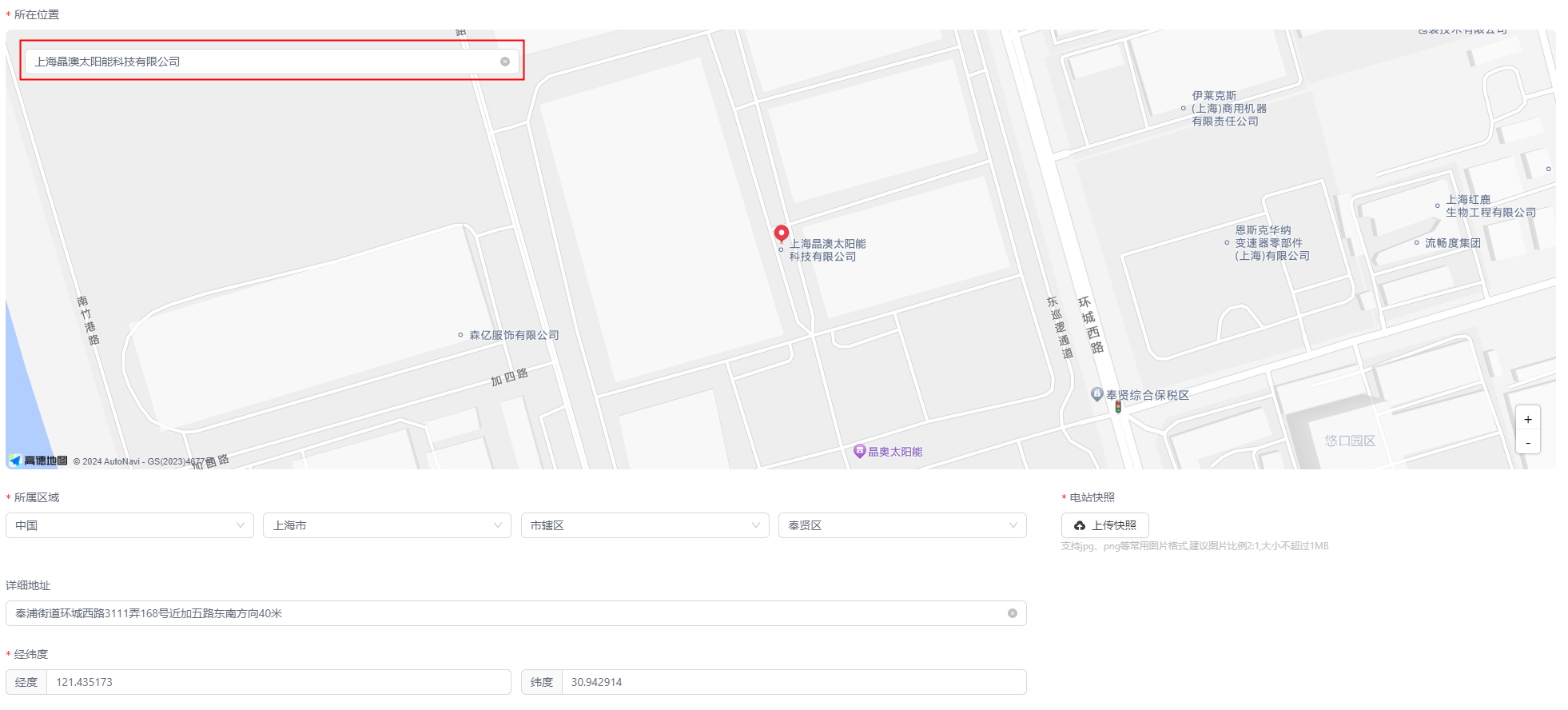
Please perfect the station basic information according to the prompts: station name, station abbreviation, location, region, detailed address, latitude and longitude, station snapshot, station time zone, station commissioning time, station construction time, station commissioning status. The items with asterisks are required, and the more perfect the other information is filled in, the more conducive it is to your management of the station.
| Parameter Name | Description |
|---|---|
| *Station Name | Name of the station |
| Station Abbreviation | Abbreviation of the station |
| *Station Snapshot | Click the "Upload Snapshot" button to select the station picture to upload |
| *Station Time Zone | Click the  icon to select the time zone where the station is located icon to select the time zone where the station is located |
| *Station Commissioning Time | Click the  button to select the station commissioning time button to select the station commissioning time |
| *Construction Time | Click the button to select the station construction time |
| *Station Commissioning Status | Click the icon to select the station commissioning status |
As shown in the figure, in the "Location" field, you can search for the location of the station to be created, and the system will automatically match the region, detailed address, and latitude and longitude information for you.
Perfect System Information
Please perfect the station system information according to the actual situation of the station you want to create: station type, system architecture (automatically switched according to the station type, cannot be selected by yourself), energy storage/PV system information. The items with asterisks are required.
Note: The items to be filled in for different station types are inconsistent. Please select the correct system type according to the actual situation.
Perfect Owner Information
Please perfect the owner information according to the prompts: station owner, contact person, contact information, email, installer, installer mobile phone number, operator. The items with asterisks are required.
Perfect Station Authorization Information
You can choose whether to enable the station authorization function. It is enabled by default. Click the organization drop-down box to select the authorized organization, thereby completing the station authorization, which is convenient for the viewing of the end users of the corresponding organization.